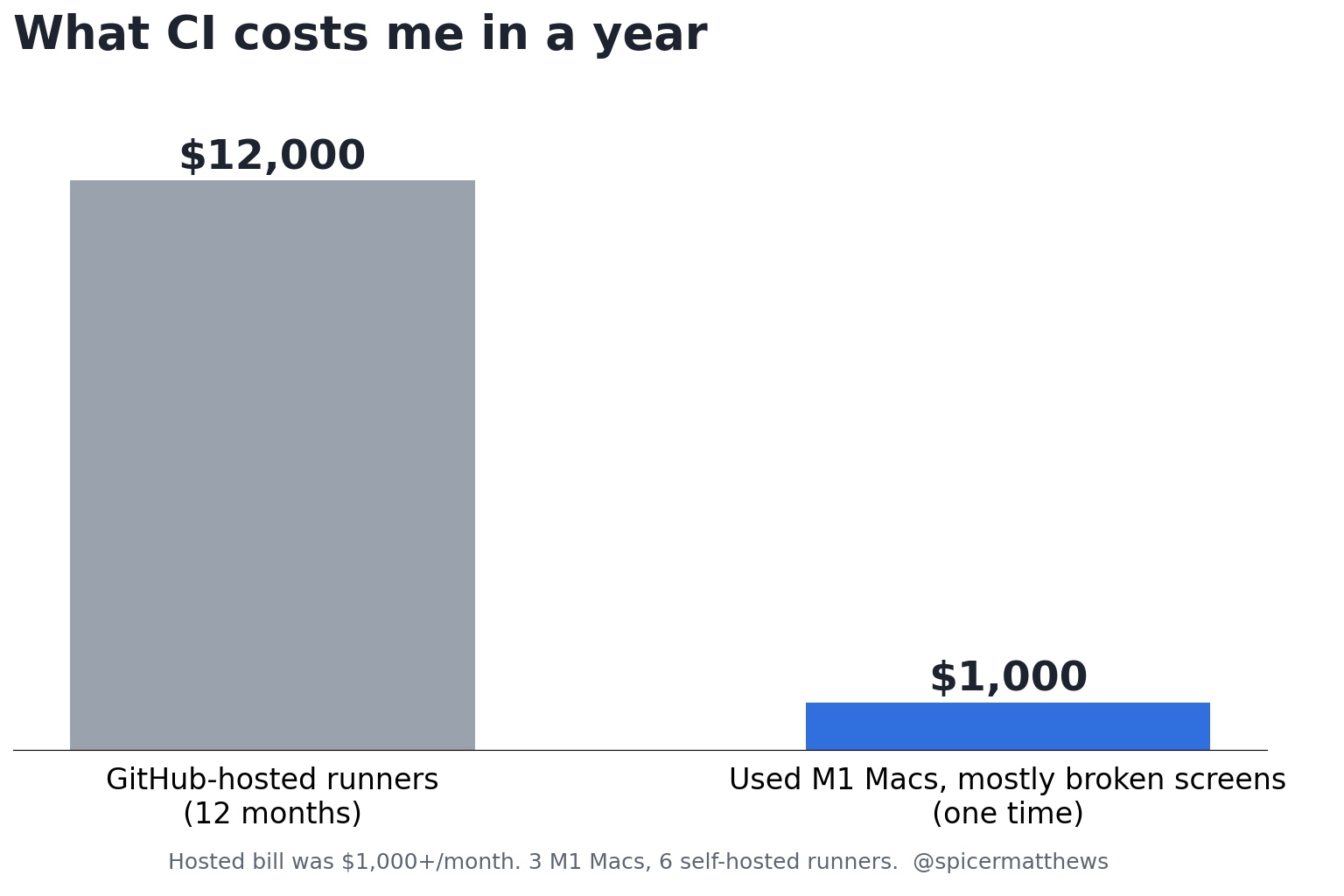
My GitHub Actions bill was over $1,000 a month. I replaced it with about $1,000 of used M1 Macs, most of them MacBooks with cracked screens from eBay. That's roughly $12,000 a year back in my pocket, and the builds run on hardware I own.
I first mentioned this in a reply on X back in August. It got about 250,000 views, which tells me a lot of developers are staring at the same bill. So here's the whole setup, including the parts that bit me.
Why a bill like that happens
We build Harbor, a notes app, for the web, Mac, iPhone, iPad, Android, and Windows. That's a lot of code, and every pull request runs tests and builds across it. Apple builds have to run on a Mac, and hosted Mac minutes are the most expensive minutes GitHub sells.
AI made it worse. Claude Code opens pull requests all day for us now. Every one of them kicks off CI. More code shipped is great. Paying for every minute of it adds up fast.
Why broken laptops and not Mac minis
The obvious answer is a Mac mini. Everyone building AI agents had the same idea this year. Apple dropped the $599 base model in May, so the Mac mini now starts at $799, and some configurations have waits measured in months.
Meanwhile, eBay and Facebook Marketplace are full of M1 MacBook Pros and Airs with a cracked screen. A broken screen kills a laptop's resale value. It doesn't matter at all to a machine that nobody will ever look at.
A MacBook with a cracked screen is basically a Mac mini with a built-in UPS, at about a third of the price. The battery turns out to be a real feature. More on that in a minute.
The fleet
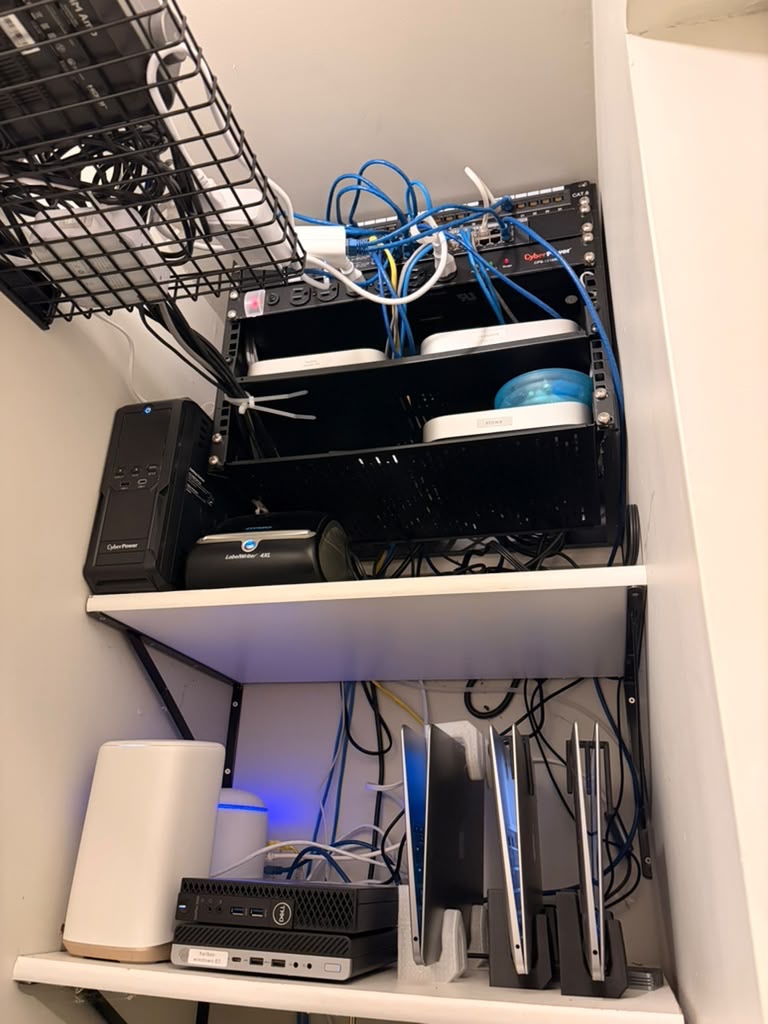
Three M1 Macs: a MacBook Air, a MacBook Pro, and one Mac mini. Each one runs two GitHub Actions runners, so that's six runners shared by every repo in the Harbor org. GitHub hands a job to whichever runner is free.
Here's the real thing. The laptops are on the bottom shelf, standing up in 3D printed stands.
A few choices made this easy to live with:
- No public IPs. The Macs sit on Tailscale. Nothing on the internet can reach them.
- Everything is Ansible. One
makecommand brings a box to a known state. Re-running it changes nothing, so it's also how I maintain them. - Dumb machines. A box gets the runner and Xcode, and that's it. Each workflow installs its own Go, Node, JDK, or Android SDK. Swapping a Mac out means registering the new one and removing the old one. No workflow changes.
- Spotlight off. Otherwise the Mac burns CPU indexing build folders and
node_modulesthat nobody will ever search.
Memory, not heat, is what caps each box at two runners. Even with no fan, the Air's limit is RAM.
Gotcha 1: run them lid open
Apple silicon laptops can't cold boot with the lid closed. Apple confirms it, and I confirmed it on my own box. Lid up, it boots. Lid down, it doesn't.
A closed laptop survives a short power outage on battery. A long one drains the battery, the Mac shuts down, and when the power comes back it stays off until someone walks over and opens the lid. There's no software fix for that.
So they run open. My son 3D printed me a stand that holds the lid up. It works great.
Gotcha 2: the battery is a UPS only if the Mac stays awake
One of the MacBooks came set to never sleep on power, but to sleep one minute after switching to battery. The first outage would have frozen it a minute in, with jobs half done.
Now a small script on each laptop handles power:
- Sleep is disabled outright, and the setup fails if it can't verify that.
- It sends me a Slack message when power drops, when it comes back, and when the Mac boots.
- It shuts down cleanly at 15% battery instead of getting cut off.
- When power comes back, the laptop boots by itself. Apple silicon laptops power on when you plug them in.
One more: turn FileVault off on these. With it on, a Mac that reboots after an outage sits at the unlock screen forever, waiting for a password nobody is there to type.
Gotcha 3: Xcode fails silently
A fresh Xcode install needs one more step before it's really ready:
sudo xcodebuild -runFirstLaunchIt installs system components, and it needs admin rights to do it. A runner works unattended, so it can never type that password. Skip the step and nothing looks wrong. xcode-select works. The version prints fine. Then every simulator build fails.
One runner was missing it, and it broke our Apple builds for over a day, including releases. Because jobs land on random runners, it didn't look like a broken machine. It looked like flaky CI. Now the setup checks for it and refuses to finish until it's fixed.
Should you do this?
If you build for Apple platforms and your CI bill keeps growing, yes. Check eBay before you check Mac mini wait times.
It isn't free. You own the hardware now, and the gotchas above are real. But they're one-time problems. You hit each one once, write it into your setup, and never think about it again. The bill was a problem every single month.